

Most visitors spend only a few seconds on a SaaS landing page before they decide to stay or leave. They usually don’t leave because your product is bad. They leave because they can’t picture themselves using it.
A demo video fixes that. Instead of reading a list of features, the visitor watches your tool solve a real problem. That feels much closer to trying it.
The trouble is that most demo videos are dull. They open with a logo animation, wander through every menu, and run for five minutes. Hardly anyone reaches the end.
This guide shows you how to plan, record, and place a demo video that people actually finish. You don’t need a studio or a big budget. You need one clear idea, a short script, and a little patience. Let’s start with the part most teams skip.
Start With One Viewer and One Problem
Before you open a screen recorder, decide who the video is for. A founder at a ten person startup wants different things than an operations manager at a large company. If you try to talk to both, you end up talking to neither.
Pick one viewer. Then pick one problem that person deals with on an ordinary Tuesday. For a project management tool, it might be “I never know which tasks are running late.” For an invoicing tool, it might be “I spend every Friday chasing payments.”
Here are three quick ways to find that problem:
- Read your last ten sales call notes and look for words that customers repeat
- Check your support inbox for the question people ask most
- Open your best customer reviews and see what they praise first
Whatever shows up again and again is your video topic. A good demo is not a tour of your product. It is a short story about one problem getting solved.
Write a Script Before You Record Anything
Many people skip this step and just hit a record. Then they ramble, click the wrong button, and say “um” forty times. Your script doesn’t need to be fancy. Half a page is plenty.
Use this order:
- The problem, in one sentence
- The result the viewer will get, in one sentence
- The steps, shown on screen, with one short line for each
- One clear next step, like “Start your free trial”
Write the way you talk, then read it out loud. If you trip over a sentence, a viewer will trip over it too, so shorten it.
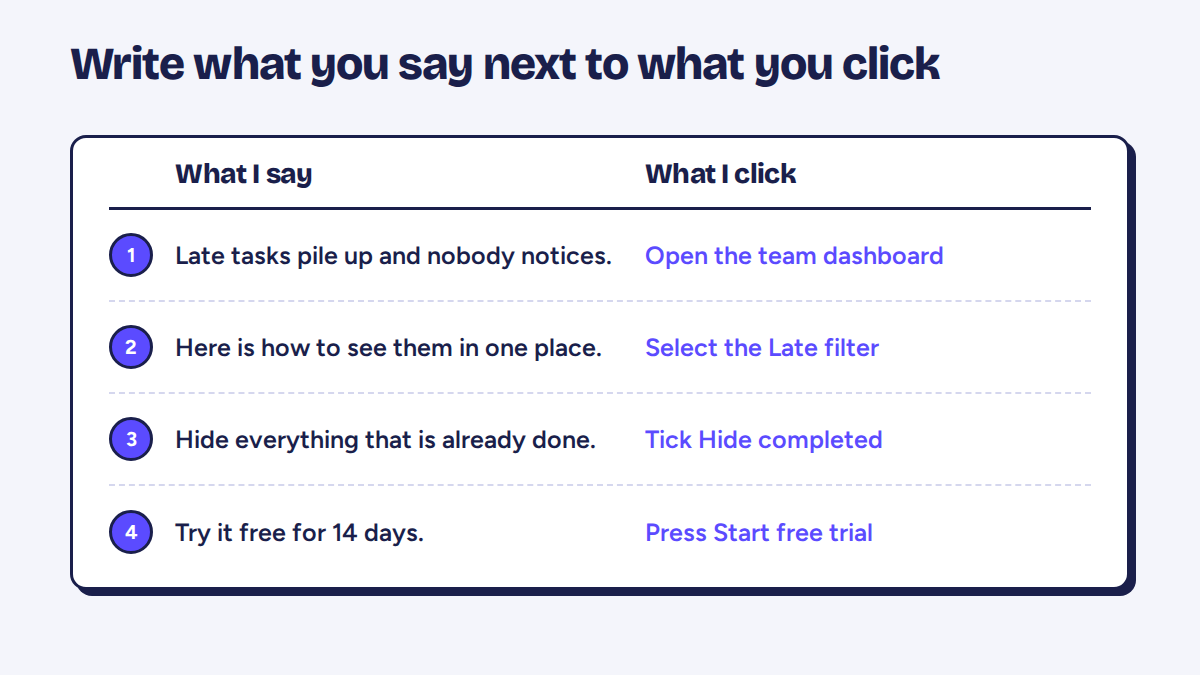
Here is a small trick that saves a lot of time. Make two columns. On the left, write what you will say. On the right, write what you will click. When you record, you always know what comes next, and your voice matches the screen. If you need to redo a part, you can find the exact spot in seconds.
Also decide what to leave out. Settings pages, rarely used features, and long setup steps don’t belong in a landing page demo. If someone needs them, a help article can cover it.
Record Your Screen So It Looks Clean
Set up your screen first. Close extra tabs, hide your bookmarks bar, and turn off notifications. Nothing kills trust faster than a random message popping up in the corner halfway through your demo.
Use a demo account with believable data. Names like “Test User 1” and numbers like 1,111 look lazy. Fill the account with realistic names, amounts, and dates so the viewer thinks, “That looks like my own account.”
Sound matters more than most people expect. Even an inexpensive headset beats a laptop mic in a room with an echo. People forgive a slightly soft picture, but they won’t sit through muffled audio.
Record in small pieces instead of one long take. One clip per step is easy to fix when you slip up. Afterward, you will want to trim pauses, join clips, and add a bit of text on screen. Simple online video editing tools like Clideo can handle all of that, so you don’t need to learn anything heavy or pay for expensive software. Clideo is an online platform that lets you edit videos, images, and GIFs right in your browser, with nothing to install. Besides trimming and merging clips, it can add subtitles, compress and resize files, and even record your screen.
Once your clips are joined, zoom in on the part of the screen where the action happens. Cursors are tiny, and plenty of people will watch on a laptop or a phone.
Keep It Short and Open With the Result
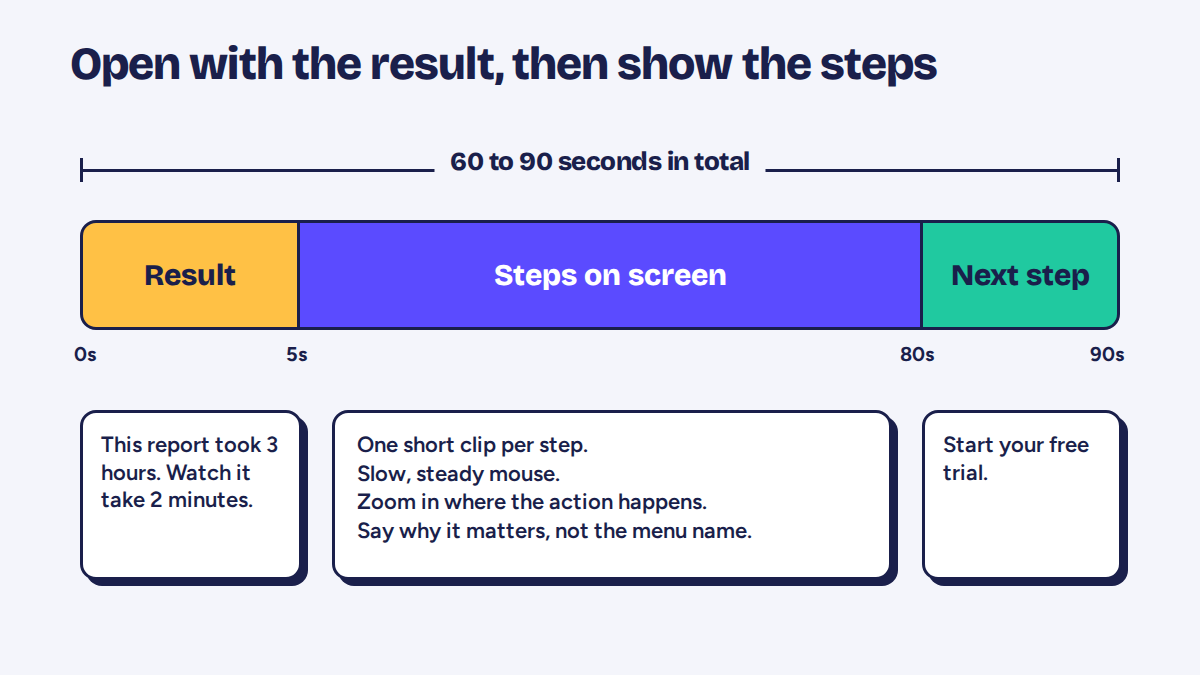
For a landing page, 60 to 90 seconds works well for most products. Some tools really do need two minutes. If yours needs more, put the longer version on a separate page and keep the short one on the landing page.
The first five seconds matter most. Don’t start with “Hi, my name is Sam and welcome to our product.” Start with what the viewer gets. Something like: “This report used to take three hours. Watch how it gets built in two minutes.”
After that hook, go back and show the steps. The viewer already knows why they should care, so they stay.
A simple way to check your pacing is to watch the video once with the sound off. Can you still tell what is happening? If a section feels slow, cut it. If a section feels rushed, add a short pause or a zoom. You will be surprised how many seconds you can remove without losing anything.
Talk Like a Helpful Coworker
You don’t need a radio voice. Imagine you are sitting next to a colleague and showing them how something works. That tone is warm, calm, and clear.
Talk about what the feature does for the person, not what the feature is called. Compare these two lines:
- “Click here to open the filter panel.”
- “Hide everything that’s already been paid, so you only see what needs chasing.”
The second one gives a reason. The first one just reads out the interface. Viewers can see the interface already. They want to know why it matters.
Also avoid words your customers never use. If your team calls something a “workflow orchestration layer” but customers call it “my to-do list,” use the customer’s words.
Add Captions
A large share of people watch videos with the sound off, especially at work or on a phone in public. If your video has no captions, those people see moving pictures and nothing else.
Keep caption lines short, with one idea per line. Check the spelling of your product name and any customer names. Captions also help viewers who aren’t fluent in English, since reading along makes your words easier to follow.
Most editors and hosting platforms can create captions automatically. Always read them through once, because automatic captions love to get product names wrong.
Place the Video Where People Will See It
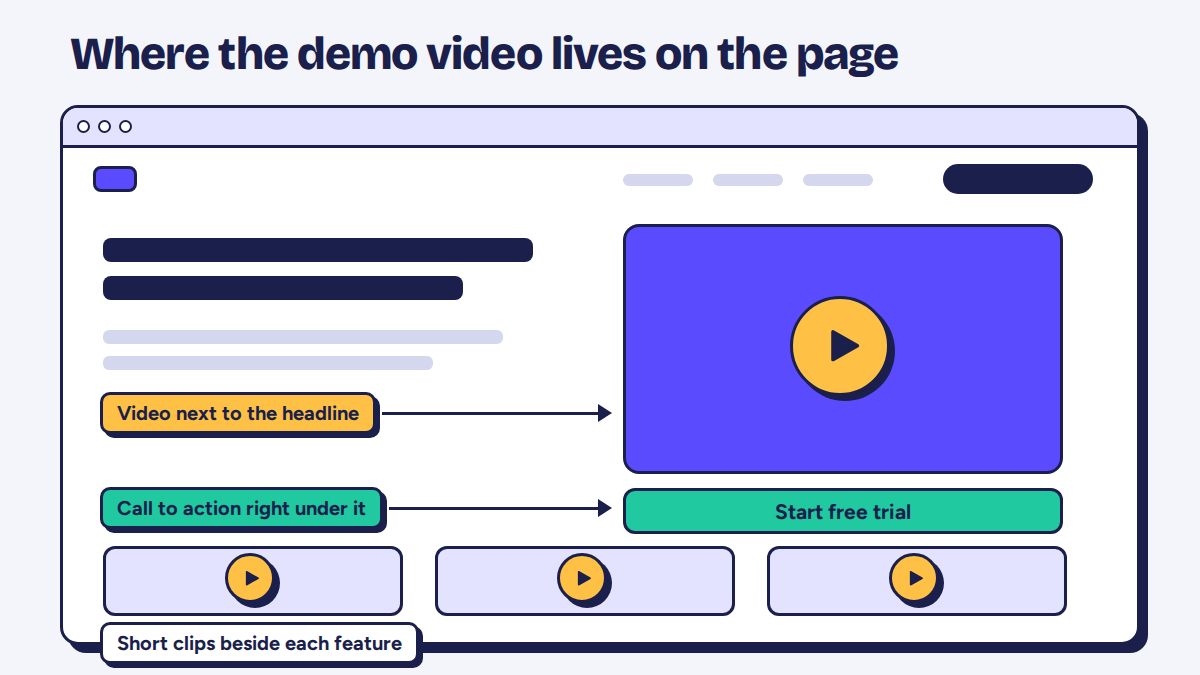
A great video is useless if nobody finds it. Here is what usually works on a landing page:
- Put the video in your hero section, close to your main headline, so visitors see it without scrolling
- Never autoplay with sound. It annoys people and many browsers block it anyway
- Use a clear thumbnail. A screenshot of the finished result beats a blurry frame from the middle of the video
- Add a simple play button and a short label like “Watch a 90 second demo”
- Repeat a call to action right under the video, such as a free trial button
Speed matters too. A heavy video file can slow your page down, and a slow page loses visitors before they even press play. Use a hosting service that loads video smoothly, and test the page on a phone with an average connection. A simple landing page can often run on static hosting, which keeps load times low.
If you have several features worth showing, consider one main demo at the top and a few short clips further down the page. Each clip can sit next to the feature it explains.
Mistakes That Quietly Hurt Your Demo
Some mistakes are easy to miss because the video still “works.” It just doesn’t convince anyone.
- Starting with company history. Visitors care about their problem first and your story second.
- Showing every feature. More features make the video blurrier, not stronger.
- Clicking too fast. If you need to rewind to follow along, the viewer already left.
- Forgetting the next step. End with a clear call to action, even a small one.
- Ignoring mobile. Check that text on screen is still readable on a small display.
- Letting it go stale. If your design changes and the video still shows the old one, visitors get confused and wonder if the product is maintained.
That last one is worth a reminder in your calendar. Review your demo video every few months and after any big product update.
How to Know If Your Video Is Working
You don’t need fancy tools to measure this. Look at a few numbers:
- Play rate: how many visitors press play. If it’s low, your thumbnail or the text around it needs work.
- Watch time: how long people stay. If most leave at the 20 second mark, look closely at what happens there.
- Sign ups after watching: do viewers sign up more often than people who skip the video?
Change one thing at a time. If you swap the thumbnail, trim the intro, and rewrite the script all at once, you will never know which change helped.
Also ask your sales or support team what prospects say about the video. A single comment like “I watched your demo and that’s exactly what I need” tells you more than a chart.
Final Thoughts
A good demo video is not about big production. It is about respect for the viewer’s time. Pick one person and one problem, write a short script, record a clean screen, and show the result early. Add captions, place the video where people can see it, and check the numbers once it’s live.
Your first version won’t be perfect, and that is fine. Publish it, watch how people respond, and improve it a little each month. Over time, that small video can become one of the hardest working parts of your landing page.